Upload wind statistics
Wind statitics
ArchiWind aggregates long-term wind records into statistical summaries (wind roses, Weibull models, etc.) that are used to weight CFD simulations.
If your project is geolocated (see Setting up a Wind Simulation), it retrieves by default 5 years of hourly winds via the MeteoBlue History API or Open-Meteo API: these APIs provide global, high-resolution hourly wind data (speed and direction) for the site location.
ArchiWind bins data by time period and direction to build wind roses and speed distributions.
For example, all 5-year hours can be grouped by annual, seasonal or monthly periods and by azimuthal sectors (e.g. 8 or 16 compass directions).
Each wind rose shows how often the wind blows from each direction and at what speeds.
Such roses are a standard meteorological summary: “a wind rose gives a succinct view of how wind speed and direction are typically distributed at a particular location”.
In practice, ArchiWind computes, for each period, the frequency of winds in each direction sector and the associated speed statistics.
These wind-rose frequencies are then used as weights when averaging CFD results.
In other words, CFD runs are performed for representative directions/speeds and the results (pressures, flows, etc.) are combined proportionally to the wind-rose frequencies.
Advanced Wind statitics settings
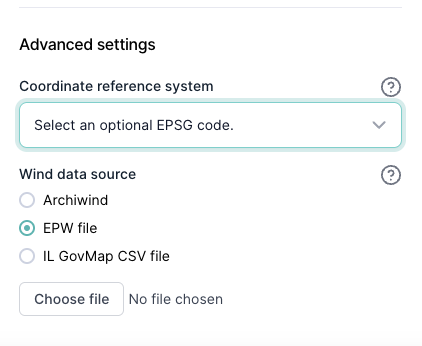
User-Provided Wind Data Files
If your project is not geolocated, ArchiWind cannot fetch wind data automatically, so you must upload your own wind data source; for geolocated projects this remains an optional alternative.
ArchiWind accepts wind data in the following formats: